Calendar - Agenda Planner
- 4.4
- Rating
- 1.00M
- Installs
- Free
- Price
 Analysis by App-foxy
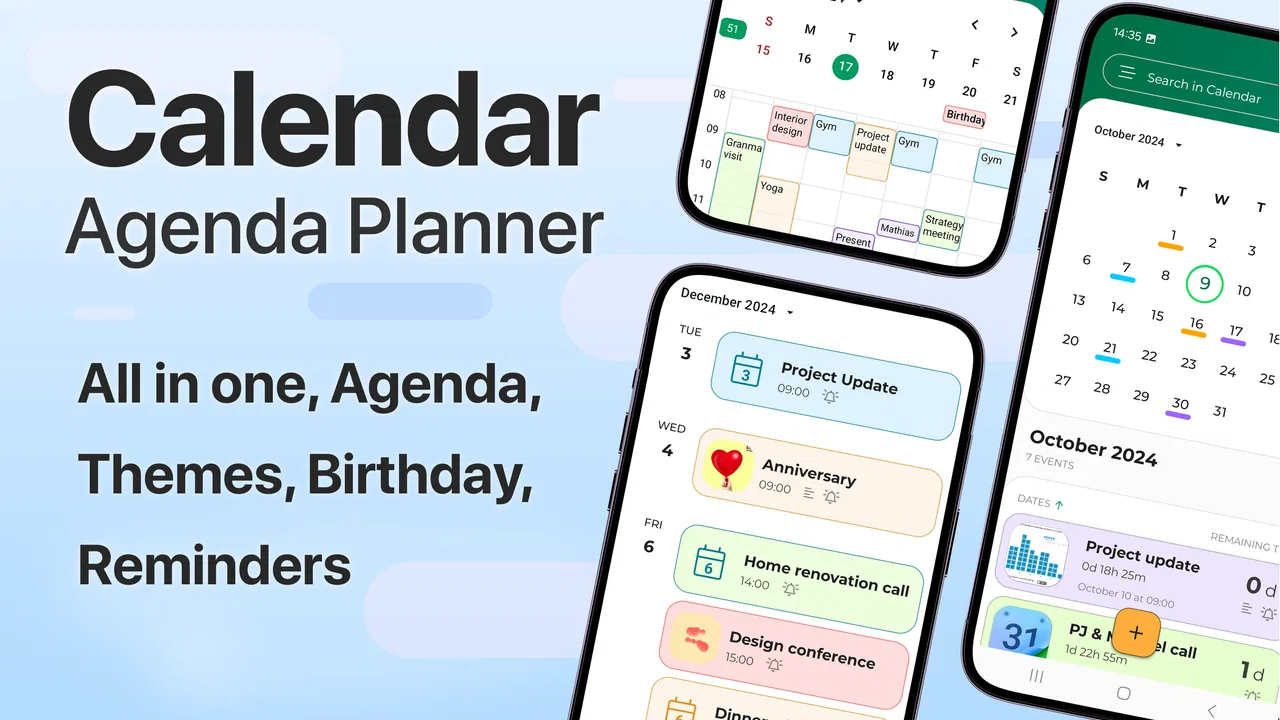
I usually lose productivity in the gap between deciding to do something and giving it a clear place in my day. A note in one app, a reminder somewhere else, and a half-finished checklist can make a simple week feel unnecessarily complicated. Calendar - Agenda Planner takes a more practical approach by putting appointments, notes, checklists, and daily planning in one productivity workspace. After using it as an everyday planning tool, I found that its real value is not any single feature. It is the way it encourages me to turn vague intentions into visible, scheduled actions.
Developed by Glad Appvestor, this free app belongs to the productivity category and is suitable for everyone. It has reached more than a million installs and holds a 4.4 average from roughly 4.2 thousand ratings, which suggests that its straightforward approach connects with a broad audience. The current version is 2.8, and it runs on Android 10 or later. Optional purchases cost $3.49 per item, so the basic experience is easy to try without committing money upfront.
From scattered intentions to a workable day
I’ll focus on the small but important shift from keeping intentions in separate places to giving each one a useful place in the day. That means looking at how a calendar entry, a note, and a checklist can support the same commitment without turning the plan into a wall of tasks.
You May Also Like

 Blood Strike: 2.5 Anniversary
Blood Strike’s Loadouts Turn Every Drop Into a Tactical Gamble
A close look at Blood Strike’s custom loadouts: how fast access to signature weapons reshapes its battle royale rhythm, rewards preparation, and narrows the gap between fights.

 Pandora - Music & Podcasts
Pandora’s Music Is Easy to Start, but Harder to Recover
Pandora’s strength is its low-effort path from a seed to a station. Its weak spot is how much confidence it asks you to place in connection, setup, and quiet recovery.

 8 Ball Pool
 Is Built on Rivalries, Rematches, and Routine
A close look at the rivalries, rematches, shared routines, and unanswered safety questions that turn a quick pool match into a persistent mobile community.

 Samsung Music
’s Quiet Strength Is Playing What You Already Own
Its reach comes less from spectacle than from dependable access to a personal library. That simplicity is both the app’s strongest retention engine and its ceiling.

 AccuWeather: Weather Radar
AccuWeather Review: A Quick, Clear Forecast for Everyday Decisions
For everyday plans, the best forecast is the one you can understand quickly. AccuWeather makes rain timing, radar, and local conditions easy to act on, with a few trade-offs.

 Hill Climb Racing
Why Hill Climb Racing Still Turns Crashes Into One More Run
A tiny car, a bumpy hill and one more upgrade: Hill Climb Racing keeps resurfacing because its simple chaos makes every near-miss feel personal.
More From Our News Desk



Why the usual planning routine breaks down
Before using Calendar - Agenda Planner, my planning habit was familiar: I would check a conventional calendar for fixed events, keep loose tasks in a notes app, and rely on memory for small errands. That system worked when my schedule was quiet. It became unreliable as soon as several responsibilities competed for attention. A meeting could be recorded correctly while the preparation for it remained invisible, and a shopping task could sit in a note without ever receiving a realistic time slot.
This app is useful because it makes the transition from “I should do this” to “I will do this at this point in the day” feel natural. A calendar entry can represent the commitment, while a note or checklist can hold the supporting details. I found that separation helpful: the calendar answers when something happens, and the attached planning material answers what I need to remember or complete.
That distinction matters for sustainable productivity. A packed calendar is not automatically a productive one. I get better results when I first enter non-negotiable appointments, then add only the tasks that genuinely fit around them. Calendar - Agenda Planner works well with that order because it gives me a place to see the day as a sequence rather than as a pile of unrelated reminders.
Capturing information without creating another mess
The most useful starting point is a quick capture habit. When an idea, errand, or obligation appears, I record it before trying to organize it perfectly. Later, I decide whether it belongs as a calendar item, a note, or a checklist entry. This prevents the common mistake of spending more time designing a planning system than actually using it.
For example, if I need to prepare for a family visit, I would not create a single vague entry called “prepare.” I would place the visit on the calendar, write the important details in a note, and break the preparation into a checklist. That might include buying supplies, confirming travel details, and setting aside time to clean. The advantage is subtle but important: each part becomes easier to act on, while the main event remains visible.
I also like using notes for context that does not deserve its own appointment. A phone number, a short list of questions, or the details of a planned purchase can stay close to the relevant day instead of being buried in a general notebook. This is especially useful when I am planning something that unfolds over several days and needs both timing and reference material.
Turning a daily plan into a repeatable routine
A daily planner is most effective when it supports a repeatable review rather than demanding constant attention. My preferred routine is short. I look ahead, check fixed commitments, choose a small number of meaningful tasks, and use checklists for the steps that are easy to forget. At the end of the day, I move unfinished work deliberately instead of allowing it to disappear into yesterday.
That last step is where many planning apps become uncomfortable: they make it easy to collect tasks but harder to confront unfinished work. Calendar - Agenda Planner encourages a more honest review because the day is visible as a whole. If I add too much, the crowded schedule shows me the problem. If I leave everything unscheduled, the empty space reminds me that intentions still need structure.
A realistic weekday might begin with a fixed appointment, followed by a short administrative block, a lunch break, and one important project task. Smaller errands can sit in a checklist rather than competing for separate calendar space. I find this approach more sustainable than assigning every tiny action a precise time. The app supports planning, but I still need to make the judgment about how much my day can actually hold.
One non-obvious benefit is that checklists can act as a bridge between recurring types of work and individual days. I can prepare a standard sequence for a weekly responsibility in my own notes, then reuse the structure when planning the next occurrence. This does not replace a specialized task-management system, but it reduces the mental effort of rebuilding the same process from memory.
A practical scenario: planning a busy personal week
Imagine I have a medical appointment, a deadline at work, groceries to buy, and a weekend trip to prepare for. I would first place the appointment and deadline-related commitments into the calendar. Then I would create a note for the trip with addresses, questions, and items I need to remember. A checklist could hold packing, shopping, and preparation tasks.
On the first day, I might choose only the grocery run and one piece of deadline preparation. On the next day, I could reserve time for the appointment and review the trip note. The checklist would show progress without forcing every item to become a separate event. This arrangement keeps the calendar readable while still giving me enough detail to act.
If the work deadline expands, I can see which personal tasks are flexible and which commitments cannot move. That is more useful than simply receiving another reminder. The app becomes a decision-making surface: it helps me compare available time with the work I am asking myself to complete.
Where the simple design helps
Calendar - Agenda Planner is easier to approach than a large productivity suite filled with projects, labels, dashboards, and collaboration settings. I do not need to understand a complex hierarchy before I can plan tomorrow. For someone moving away from paper planning or scattered phone notes, that lower barrier is a real strength.
The combination of agenda, notes, checklist, and daily planner tools also suits people whose responsibilities are personal rather than team-based. Students can connect study plans with deadlines. Parents can keep event details and shopping steps together. Freelancers can separate client appointments from the preparation needed before each one. Anyone who prefers seeing the day in context may find this more useful than a standalone checklist.
The store summary describes it as an agenda and calendar app with notes, checklist, and daily planner tools, and that combination accurately reflects its role. I would not approach it expecting a full project-management platform. I would approach it as a compact daily command center for people who want planning information close together.
Three workflows that make it more useful
First, I recommend separating commitments from intentions. Put appointments and deadlines on the calendar, but keep optional tasks in a checklist until you know where they realistically fit. This prevents the schedule from becoming a misleading display of everything you hope to accomplish.
Second, use notes for decisions, not just facts. When a task depends on a choice, recording the reasoning beside the relevant day can save time later. For example, a note about a purchase can include the comparison points I care about, while the checklist contains the actions still required. This turns the app into a small memory aid rather than a simple date grid.
Third, plan with recovery time. I leave open space after demanding commitments instead of filling every visible gap. If the day goes smoothly, I can use that time for a checklist item. If something takes longer, the plan does not collapse immediately. This is a small change, but it makes the system much easier to maintain over a long period.
Friction points and realistic limitations
The same simplicity that makes the app approachable can feel limiting for advanced users. If I need detailed project dependencies, sophisticated filtering, team assignments, or a deeply structured knowledge base, I would look toward a dedicated task manager or project platform instead. Calendar - Agenda Planner is better at coordinating a person’s day than managing a complex operation.
There is also a risk of overloading the central view. Combining events, notes, and checklists is convenient, but it requires discipline. If I treat every thought as equally urgent, the planner becomes noisy. The app cannot decide which commitments matter most or protect me from unrealistic scheduling. Its usefulness depends on the quality of the planning choices I bring to it.
People who already have a reliable calendar and task system may not gain enough from moving everything. Switching tools has a cost: information must be reorganized, habits must be rebuilt, and there may be less value in duplicating an established workflow. I would adopt this app when the current system feels fragmented, not merely because another calendar is available.
The optional purchases are another consideration. The app is free to start, but some items cost $3.49 each. That makes trying the core experience low-risk, while anyone who wants to unlock additional paid elements should decide whether those extras improve the actual routine rather than buying them automatically.
Who should use it, and who should choose something else
I think it is a strong fit for someone who wants one place for daily scheduling and lightweight task organization without learning a complicated productivity method. It is particularly suitable for people who think in days and weeks, who need notes beside appointments, and who often forget the small steps behind a larger responsibility.
It can also work well for a student balancing classes, revision, errands, and personal appointments. The calendar can show fixed academic commitments, while checklists break study sessions into manageable actions. A note can hold reading points or questions to revisit. The benefit is not that the app performs the work; it makes the next action easier to see.
I would be more cautious about recommending it to a team that needs shared ownership, detailed workflow states, or extensive reporting. I would also suggest a different option for someone who wants an extremely minimal calendar with no planning layer at all. In that case, the added notes and checklist structure may feel unnecessary rather than helpful.
Getting started without abandoning the system after a week
When setting it up, I would avoid importing every obligation at once. Begin with the next few days, add fixed commitments, and create only the checklists that support real upcoming events. After using the app through one normal week, review which entries helped and which created clutter.
I would also keep the daily plan deliberately short. Three meaningful actions are easier to complete and review than a long list that repeatedly rolls forward. Use notes to preserve useful context, but do not turn every task into a paragraph. The best setup is the one I can maintain when I am tired or busy, not the one that looks most impressive during initial planning.
Because the app supports Android 10 and later, compatibility should be straightforward for people using a relatively recent Android device. Its Everyone content rating also makes it appropriate for a broad audience, including households that want a simple shared planning habit on personal devices.
My overall experience
Calendar - Agenda Planner succeeds when I use it as part of a calm, repeatable routine rather than as a place to store every possible obligation. Its strongest idea is the connection between timing and preparation: an event can have the notes and checklist needed to make it happen, while the daily agenda keeps the workload visible.
I appreciate that it does not force me into an elaborate productivity philosophy. I can start with tomorrow’s schedule, add a few practical tasks, and gradually build a habit around reviewing what is coming next. The trade-off is that users seeking advanced organization may outgrow its lighter approach, and careless planning can still produce a crowded or unrealistic day.
For me, the app is worth recommending to anyone whose current system is split between a calendar, loose notes, and forgotten errands. It is free to try, broadly accessible, and focused on the everyday problem of turning plans into actions. Its best use is not filling every minute, but giving important work a clear place and a manageable next step. If that is the kind of structure you need, Calendar - Agenda Planner offers a practical starting point without making productivity feel like another project.
FAQs for Calendar - Agenda Planner
01What is Calendar - Agenda Planner used for?
Calendar - Agenda Planner is designed to help you organize appointments, meetings, tasks, reminders, and personal events in one place. After exploring the app, its main strength appears to be the agenda-style view, which makes it easy to see what is planned for the day or week. It can be useful for work, school, family arrangements, and general time management.
02Does Calendar - Agenda Planner offer reminders and notifications?
Yes, the app is intended to support reminders and notifications for scheduled events, helping users avoid missing appointments or deadlines. Before relying on it for important commitments, check the notification permissions and your device’s battery-saving settings, since some phones may restrict background alerts. You should also confirm that the selected reminder time is correct when creating each event.
03Can I synchronize Calendar - Agenda Planner with other calendars?
Calendar - Agenda Planner may provide synchronization with calendars already connected to your device, depending on the version and operating system. This can make it easier to view existing appointments without entering them manually. However, synchronization options can vary between Android and iOS, so users should review the app’s account, calendar-access, and import settings before downloading if cross-device access is important.
04Is Calendar - Agenda Planner free to download and use?
The application may be available as a free download, but certain features can depend on the version installed, advertising model, or optional premium purchases. Potential limitations may include advanced customization, additional views, cloud synchronization, or removal of advertisements. It is recommended to check the download page and in-app purchase information carefully so you understand what is included before subscribing or paying.
05Is my calendar information private and secure in Calendar - Agenda Planner?
Calendar data can contain sensitive details such as work meetings, personal appointments, locations, and contacts, so privacy should be considered before granting permissions. Review the app’s privacy policy and the permissions requested during setup. If synchronization or an online account is offered, find out how information is stored and shared. Avoid entering highly confidential details unless you are comfortable with the app’s data practices.
Pros
- Clean calendar layout makes appointments easy to scan.
- Supports recurring events for regular tasks and commitments.
- Agenda view helps prioritize upcoming activities quickly.
- Useful reminders can reduce the chance of missing appointments.
- Suitable for organizing both personal and work schedules.
Cons
- Some advanced planning tools may require a premium subscription.
- Initial setup can take time if you have many calendars to import.
- Notification behavior may depend on your phone’s battery settings.
- Limited customization may not satisfy users wanting detailed themes.
- Sync issues could occur when switching between devices or accounts.

Calendar - Agenda Planner
Gallery